
n8n automation: the 7 processes worth automating first
n8n workflow automation: the 7 business processes that pay back fastest when you automate them — and the one rule that keeps them reliable.

There is a number worth starting with. McKinsey’s research puts the share of work hours that current technology could already automate at around 57% — with software handling most of it. That is a ceiling, not a forecast, and chasing all of it at once is one of the surest ways an automation project fails. The useful question is much smaller and much more answerable: of all the repetitive work in your business, which one process should you automate first?
Why n8n, specifically
A word on the tool, since the post names it. n8n is a workflow-automation platform — a visual canvas where you connect your apps, databases, and AI models into automated flows. It has had a notable couple of years: it raised a $180M round in late 2025 with NVIDIA’s venture arm taking part, and by mid-2026 it was valued at $5.2 billion after SAP took a stake to use it as an automation layer. Around 230,000 active users, three thousand-plus business customers, and one of the most-starred open projects on GitHub.
Two things make it the right tool once automation gets real. It prices per workflow run, not per step — so a workflow with thirty steps costs the same as one with three, where Zapier and Make would bill for every step. And it can run on your own server, so your data never leaves your infrastructure. The honest trade-off: it has fewer one-click integrations than Zapier and a steeper learning curve. It rewards being built well — which is a fair description of the whole category.
How to choose what to automate first
The instinct is to automate whatever annoys you most. The better filter is payback against effort. Some processes return a lot for a small build; others return a lot but take real engineering. Start with the first kind, bank the win, and let it fund the rest. Here is roughly how the seven sort.
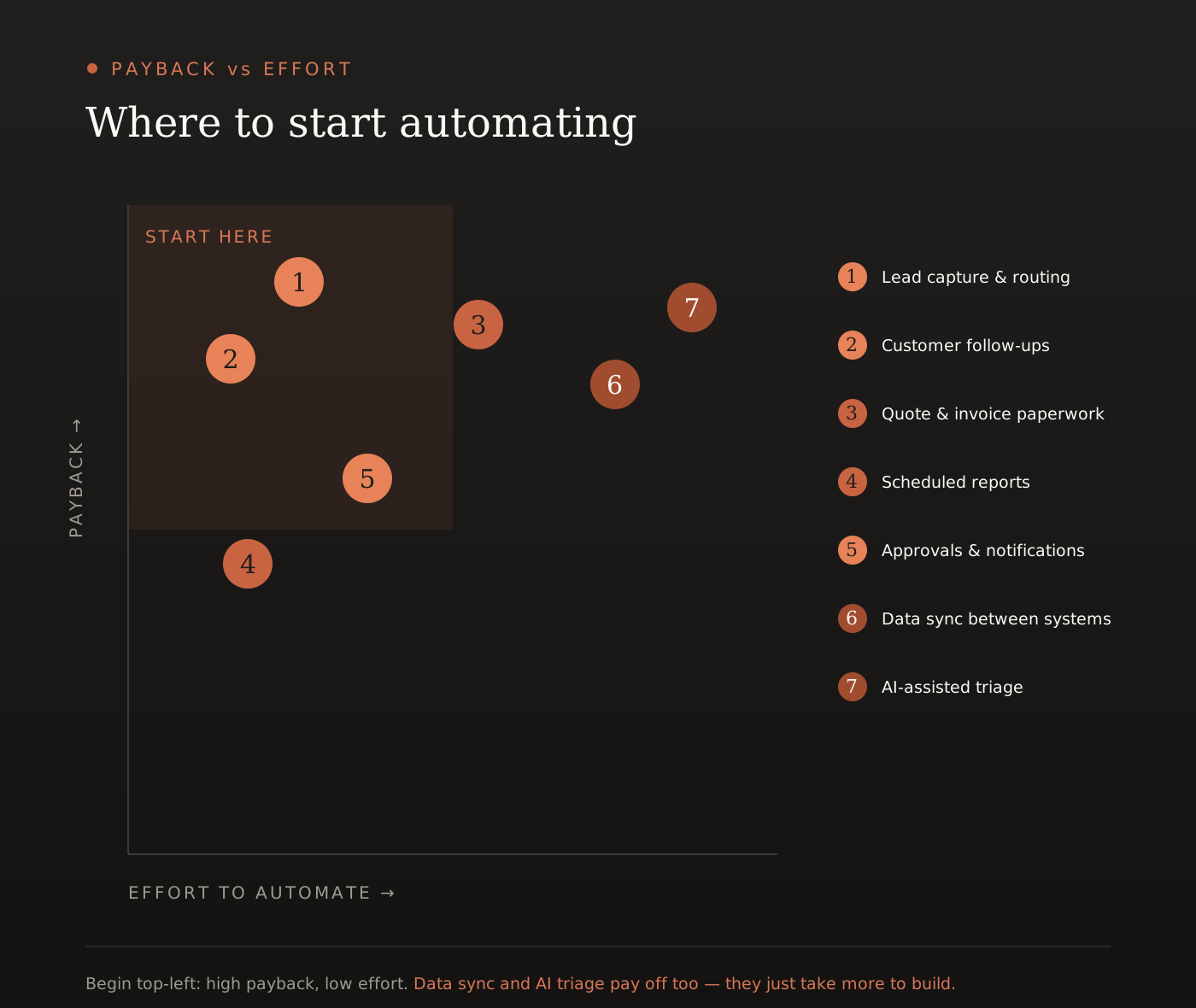
And here are the seven, in the order we would usually take them.
1. Lead capture and routing
A lead arrives — a form, an email, a call — and a person copies it into the CRM, tags it, assigns it, and sends a first reply. Automate the whole path from “lead exists” to “right person notified, record created, first response sent.” This is almost always the highest-value automation in the building, and the reason is one of the most-cited findings in sales research: a Harvard Business Review study of more than two thousand companies found that contacting a lead within five minutes makes you twenty-one times more likely to qualify it than waiting thirty. The average business takes hours. An automation answers in seconds.
2. Customer follow-ups and reminders
Appointment reminders, review requests, renewal notices, the second touch on a quiet quote. Each one is small and easy to forget, which is exactly why they get dropped — and a dropped follow-up is revenue you already earned the right to. Automated appointment reminders alone reduce no-shows by somewhere between 20 and 40% across study after study. Low effort, immediate payback: this belongs near the front of the queue.
3. Quote, invoice, and onboarding paperwork
The document chain after a “yes” — quote, invoice, contract, welcome email, folder setup — is predictable and almost entirely mechanical. It is also expensive: processing a single invoice by hand takes around twelve minutes and costs, by common benchmarks, well over ten dollars once labour is counted, while automation pulls that down to a couple of dollars. More importantly, automating it means the moment a deal is won the paperwork is already moving, instead of losing momentum while someone gets around to it.
4. Scheduled reports
If someone spends Monday morning assembling the same report from the same four places, that is a workflow, not a job. Knowledge workers lose hours every day to manual coordination — pulling numbers, updating statuses, compiling. Automate the collection and the formatting; leave the human the only part that genuinely needs a human, which is reading it and deciding what to do.
5. Internal approvals and notifications
The chase. “Did this get approved?” “Has the order shipped?” “Who is handling this ticket?” A quarter of managers, by survey data, spend twenty hours or more a week on repetitive admin of this kind. Routing approvals and notifications to the right person at the right moment, with the context already attached, removes a surprising amount of the low-grade friction that quietly slows a team down.
6. Data sync between systems
Most businesses run a CRM, an accounting tool, a project tool, and a spreadsheet that do not talk to each other — so a person keeps them in sync by hand. Manual data entry is estimated to cost businesses on the order of tens of thousands of dollars per employee each year, and the errors it introduces cost more than the time. A sync workflow makes the systems agree continuously, and ends a whole category of “the numbers do not match” problems. It pays off well — it simply takes more to build, which is why it sits later in the queue.
7. AI-assisted triage
This is where n8n earns its place in an AI-native studio’s toolkit. n8n ships dozens of AI nodes, so a language model can sit inside a workflow and make a judgment: classify an inbound email, summarise a long thread, pull the fields out of a quote request, route a support ticket to the right team. Support teams spend roughly a third of their time just triaging — reading, tagging, prioritising — and that is the part a model handles well. It is high payback, but it adds a per-call AI cost and a dash of unpredictability, so it wants careful error handling and a human checkpoint. Powerful, and worth doing second, not first.
Automate the work that is repetitive, rule-based, and high-volume. Leave the judgment calls to people — and put a person on the exceptions.
What it actually returns
The numbers on automation ROI are wide, because vendors quote the best ones. Here is the defensible version. Teams that automate genuinely manual work commonly free up ten to fifteen hours per person per week. A Forrester-style economic study of business automation found a 248% return over three years, with payback inside six months. A sober expectation for a single well-chosen automation is a 200–400% return over a couple of years.
One honest caveat: the time saved is only about a third of the value. The rest is fewer errors, faster cycle times, work that no longer falls through the cracks, and staff freed for things that genuinely need a person. Count only the hours and you will undervalue the whole exercise.
The one rule that keeps automations reliable
n8n makes a workflow work in an afternoon. Keeping it working at 2am, unattended, when an upstream service is having a bad night — that is the engineering, and it is where most automation projects quietly fail. Not at launch: months later, when an API changes its format, a workflow drifts, and the team goes back to doing half the job by hand because nobody owns the automation’s health.
Every workflow worth running in production assumes each step can fail. n8n gives you the tools for exactly that — per-step retries with backoff, a separate error workflow that fires an alert the moment anything breaks, the option to continue past a non-critical failure rather than halt the whole run. The rule is simple: a workflow must fail loudly and recover cleanly. A workflow that fails silently is worse than no workflow, because you trusted it.
How Zaibex approaches it
We treat automation as engineering, not as wiring boxes together — built to fail loudly, recover cleanly, and be watched. The platform itself is nearly free; what matters is which process you start with, and whether the workflow survives contact with a bad night. The free discovery call and free audit are where that gets decided: we map where your team is moving information by hand, work out which of the seven above pays back fastest for you, and tell you honestly which to automate now and which can wait. The hours your team currently spends on mechanical work are the cheapest growth a business has — automation is just the decision to stop spending them.
